Delete Open Learning Assignments
Follow the provided steps to remove assignments from an Open Learning course that are no longer needed.
Tags
- McGraw Hill Social Studies
- TX Science 2025 (K-12)
- Asi se Dice 2024
- Arrive Math
- SSO & Manual-Rostering
- Inspire Science 2020
- Customer Support
- Number Worlds 2024
- Middle School
- Direct Login & Manual-Rostering
- High School
- Glencoe Health 2022
- CA Impact 2019
- Classroom Teacher
- CA Inspire Science 2020
- SSO & Auto-Rostering
- PreK-12
- Elementary School
- FL Science 2025 (K-12)
- World Languages
- Math
- Health
- Direct Instruction
- Intervention
- Literacy
- Grades & Assignments
- Social Studies
- Direct Login & Auto-Rostering
- Core
- CA Reveal Math (K-12)
- AP, Honors & Electives
- Teen Health 2021
- FL Social Studies 2024 (K-12)
- Building Blocks PreK 2025
- Building Blocks 2024
- Science
- McGraw Hill Literacy
- Preschool
- Online Assessments
- LearnSmart®
- Smartbook® Integration


This article walks teachers through deleting assignments for an Open Learning course.
For a full page view of the demo, click here.
For a Spanish version of the demo, click here.
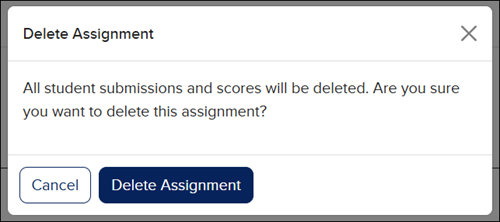
Keep in mind, when deleting assignments, it also deletes all student submissions and scores for that assignment.
1. SSO or log in at my.mheducation.com.
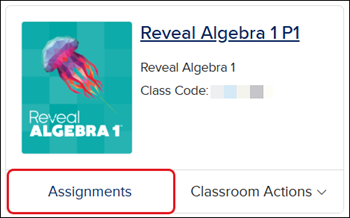
2. Click the Assignments button on the course tile,
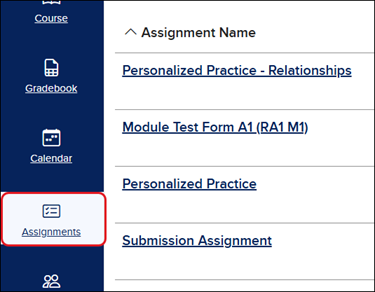
or launch the class and click on Assignments from the navigation menu.
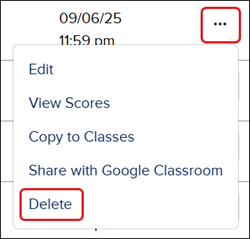
3. Click on the Options button in the Action column.
4. Click Delete from the menu.
5. On the Delete Assignment pop-up, click the Delete Assignment button to confirm.